18 January 2024
Perfmatters Review: Is It the Best WordPress Performance Plugin?
Speed matters. A lot. According to the Tooltester website statistics post, 53% of mobile site visitors will leave a page if it takes more than three seconds to load.
This means a slow site can hurt your search engine rankings, frustrate visitors, increase your bounce rate, and ultimately have a big impact on your bottom line. That’s where Perfmatters steps in—and makes a bold promise. Fewer scripts. Faster load times. No unnecessary clutter.
But is it really the best WordPress performance plugin? Or just another tool riding the speed optimization wave?
In this Perfmatters review, we’ll dig into what the plugin does, how it works, and whether it truly deserves a spot on your WordPress site.
Let’s find out if Perfmatters is the performance boost your website has been waiting for.
What is Perfmatters?

Perfmatters is a premium WordPress performance optimization plugin that focuses on “web performance optimization” (WPO) by reducing HTTP requests and stripping away “code bloat.”
While traditional plugins focus on caching, Perfmatters takes a surgical approach to speed by disabling unnecessary WordPress features and scripts that slow down PageSpeed Insights scores.
No time to read the whole Perfmatters review? You can go straight to Perfmatters here!
How does the Perfmatters Plugin work?
The Perfmatters plugin works by reducing unnecessary load on your WordPress website. Instead of adding more features, it focuses on disabling what you don’t need. Perfmatters allows you to turn off unused scripts, styles, emojis, embeds, and other default WordPress options that slow down your site.
It also offers script management, so you can disable CSS and JavaScript files on specific pages. This prevents extra files from loading where they are not required. Perfmatters integrates smoothly with caching plugins and CDNs to improve overall performance.
By minimizing HTTP requests and reducing page size, Perfmatters helps your website load faster. Faster loading improves user experience, SEO rankings, and conversion rates without complex setup or coding knowledge.
Perfmatters Plugin Features
The plugin provides a number of features and optimizations to improve website speed. Here are some of the key features of Perfmatters:
1. Quick-Toggle Options
Perfmatters offers a range of quick-toggle options designed to streamline the process of optimizing your WordPress website’s performance. These quick-toggle options provide an intuitive and user-friendly interface, allowing you to easily enable or disable specific functions with just a click. Some of the key quick-toggle options in Perfmatters include:
- Disable Emojis: This option lets you disable the WordPress default emojis, which can slightly reduce load times by removing unnecessary HTTP requests.
- Disable Embeds: By toggling this option, you can prevent others from embedding your content and disable loading of embedded content from other sites, further improving speed.
- Heartbeat Control: The Heartbeat API in WordPress can generate periodic activity that affects server resources. This toggle allows you to control or disable the Heartbeat API to save resources.
- Disable XML-RPC: XML-RPC is a system that enables remote updates to WordPress from other applications. Disabling it can enhance security and performance if you don’t use remote publishing.
- Google Fonts Optimization: This feature optimizes the loading of Google Fonts, which can significantly impact your site’s loading times.
- Disable comments: No blog? Disable comments on the entire site to reduce spam, or remove author comment links to prevent users from just trying to get a backlink.
- Disable or limit post revisions: Disable or limit the number of post revisions that WordPress saves to keep your database from growing out of control.
- Add Blank Favicon: Generate a blank favicon for your site if you have not.
- Disable Self-Pingbacks: When enabled, this can generate a self-pingback, which is nothing more than spam. Disables them can prevent these pingbacks from being generated.
- Disable RSS Feeds: If you run a blog, somebody may be listening through the RSS feed, so don’t set it to disable. If you set it to “ON”, it will disable the RSS feed.
2. Built-In Script Manager
The Script Manager allows you to disable plugins that are automatically loaded on pages where they are not needed. For example, the Contact Form 7 plugin loads itself on each page and post. You can easily disable it everywhere with a single click and only enable it on your contact page.
Furthermore, Script Manager organizes scripts based on the plugin that loads them. This allows you to see which scripts are being used by whom.
3. Database Optimization
WordPress database optimization is essential for a website to run properly and fast. Undeleted revisions, for example, can easily add up to hundreds of thousands of rows. You should maintain your database on a regular basis so that it remains healthy and performs effectively.
The Perfmatters plugin can help you quickly clean up and remove outdated and unnecessary data. It may help in the following ways:
- Delete old post revisions.
- Delete old drafts and spam comments.
- Clean trash.
- Optimize the database.
Plus, you can also schedule database optimization.
4. Lazy Loading
This feature does not load videos, images, or iframes until the user scrolls down the page. This is particularly useful for posts and pages that contain a lot of images or videos since it decreases the number of HTTP requests. According to tests, websites using lazy loading can reduce loading times by more than 30%.
If you are not lazy-loading yet, you should be. Here are some lazy load features in the Perfmatters plugin:
- Use lazy load for images, iframes, and videos.
- Automatically exclude leading images (logo or featured image) from lazy loading to help improve LCP.
- DOM monitoring for improved infinite scroll compatibility on dynamic sites.
- Change the threshold of the viewport to be more or less aggressive.
- Lazy load CSS background images.
5. WordPress Login URL
WordPress uses https://yourdomain.com/wp-admin/ as the default login URL. The issue with this URL is that bots, hackers, and other malicious software look for them while looking for weaknesses and access points to your website.
Simply changing your WordPress login URL to something more mysterious can help you overcome this issue. It’s also good for performance since it keeps bots from scraping common parts of your site.
You can change your login URL in a matter of seconds via the Perfmatters plugin.
6. Host Google Analytics Locally
Hosting Google Analytics locally can help your site load faster by minimizing unnecessary DNS lookups and fixing the “leverage browser caching” issue in its script.
Ironically, Google’s own script gives a caching warning. This is because their HTTP caching header expiration is set to a very short time. When you host it yourself, the HTTP caching headers from your CDN or server are used. In other words, you have complete control over how the script is cached.
7. Include CDN
If you want to speed up your WordPress site, one solution is to use a Content Delivery Network. CDNs store your website’s assets on many servers around the world and serve them from the cache nearest to the visitor. The Perfmatters plugin makes it easier to connect a CDN to your WordPress site.
8. Preloading Resources
Preloading assets is a terrific way to boost your WordPress performance. However, while optimizing your website for a higher LCP score, just preload the vital elements required to show the above-the-fold content. This will allow your website to load fast and effectively.
9. Multisite Support
Do you own a lot of WordPress websites? No problem.
The Perfmatters unlimited license is compatible with WordPress multisite setups. This allows you to simply apply settings from your network’s main website to your subsites.
10. Add Custom Code
Until now, we’ve discussed ready-made features that speed up your WordPress website.
What if you want to add some custom code to your WordPress site’s header, body, or footer?
The Perfmatters plugin makes it easy to add custom code to your website.
Now that we’ve looked at all of the key features of the Perfmatters plugin, let’s look at pricing plans.
Perfmatters Pricing
Perfmatters is a premium plugin, meaning you must pay for it. The plugin offers three plans:
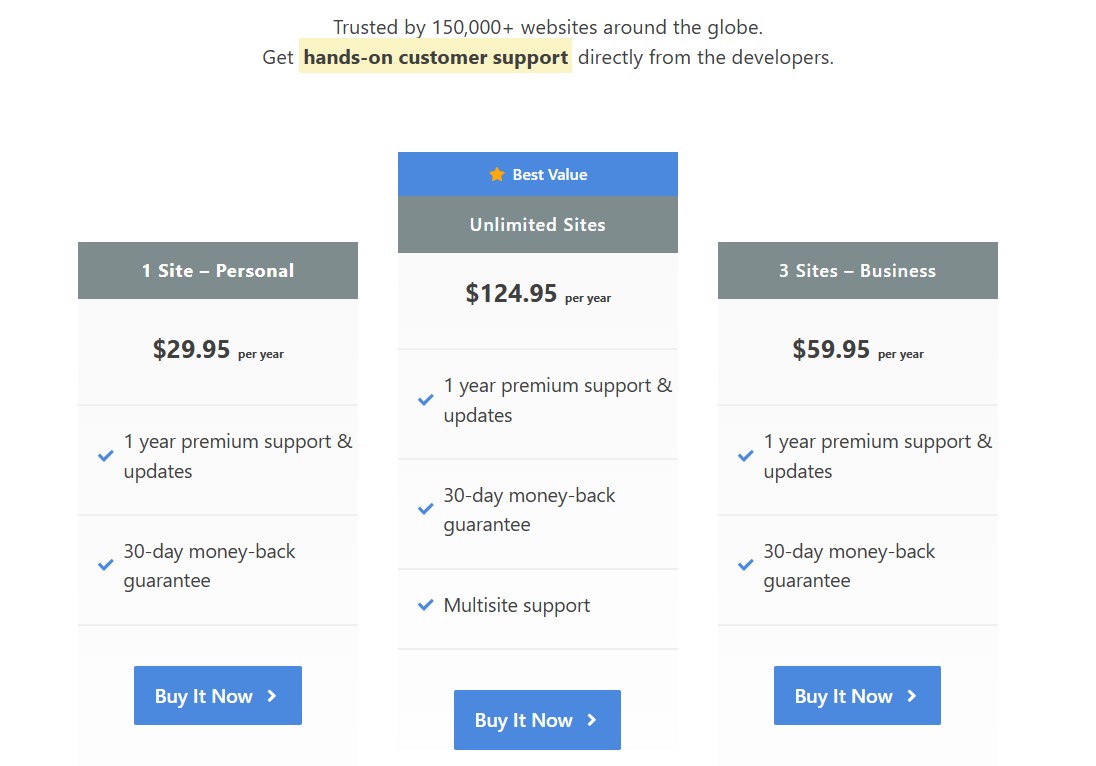
- Personal: It costs $29.95 per year for a single site license.
- Business: It costs $59.95 per year for a three-site license.
- Unlimited: It costs $124.95 per year for an unlimited site license.
All plans come with 1-year premium support, updates, and a 30-day money-back guarantee.
Perfmatters Review Pros and Cons
Here are some of the pros and cons of using Perfmatters:
Pros:
- Lightweight and easy to use.
- Improves website performance.
- Includes various performance optimization features.
- Value for money.
- Great customer support.
Cons:
- No free version or lifetime plan.
Perfmatters User Reviews And Testimonials
Before purchasing a premium plugin, it is usually good to read user reviews.
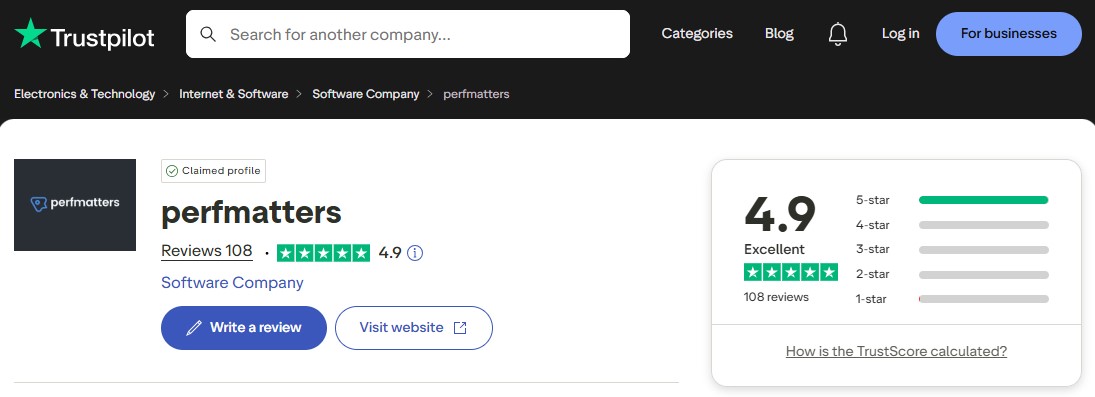
On Trustpilot, the Perfmatters plugin got 4.9 out of 5-star ratings from more than 100+ reviews.
Plus, many professional experts also recommend Perfmatters to users in their testimonials.

Perfmatters Alternatives
There are many good alternatives to Perfmatters. For this Perfmatters review, we will take a closer look at three of them.
1. WP Rocket

WP Rocket is a premium caching plugin that significantly enhances your website speed and performance. It improves your site’s loading performance by caching static content such as CSS, JavaScript, images, and other resources. Perfmatters currently lacks caching functionality. It is used by over 3.8 million websites.
Learn more in our complete WP Rocket review.
The main features are:
- Page Caching
- Cache Preloading
- GZIP compression
- Database optimization
- Google fonts optimization
- Lazy loading of images
WP Rocket Pricing:
WP Rocket price ranges from $59/year for a single site to $299/year for unlimited sites.
2. NitroPack

NitroPack is more than just a WordPress speed plugin. It is a comprehensive speed optimization tool.
It includes everything you need to optimize your performance, such as a CDN, lazy loading, image optimization, extensive CSS and JavaScript modification, and more.
Furthermore, it is easy to set up. You only need 5 minutes, and you’re done.
Learn more in our complete NitroPack review.
The main features are:
- Automatic website optimization
- Supports various content management systems
- Global CDN
- HTML, JS, and CSS minification & compression
- Various caching types (page, browser, and more)
- Defer JS loading
NitroPack Pricing:
Offer a free plan to test out. The premium plan starts from $16.63/mo (billed annually) for a single site usage.
3. Asset CleanUp Pro

All WordPress plugins create assets. Unfortunately, several of these plugins put their assets on all of your pages, even if they aren’t in use everywhere.
Suppose you use a popup plugin to convert users on your sales page.
That plugin could also load assets on your home page.
This is when Asset CleanUp comes in handy. This plugin cleans assets that are not being used.
And, while it looks like a small thing, it can have significant impacts on site performance.
And that is not something that most WordPress performance plugins provide. As a result, this tool may be useful in conjunction with any other WordPress plugins you have installed to boost speed.
Asset CleanUp Pro Pricing:
Asset CleanUp Pro price ranges from $49/year for a single site to $149/year for unlimited sites.
Conclusion on Our Perfmatters Review
In conclusion, our review of Perfmatters reveals it to be a robust and user-friendly plugin that significantly enhances WordPress website performance.
Its array of features, from script management to database optimization, addresses various aspects of site speed and efficiency. The simplicity of its interface makes it accessible for beginners, yet it retains enough depth to satisfy more technically inclined users.
While it is a premium plugin, the investment seems justified, given the tangible improvements in loading times and overall site functionality.
Furthermore, it comes with a 30-day money-back guarantee, which makes it a risk-free investment.
You should definitely try it!
For more, check out these other helpful resources:
Lastly, follow us on Facebook and X (formerly Twitter) to stay updated on the latest WordPress and blogging-related articles.
Frequently Asked Questions
Is Perfmatters Beginner-Friendly?Yes, Perfmatters has an intuitive interface, making it suitable for beginners to optimize their websites without coding knowledge or complex setups.
Yes, Perfmatters has an intuitive interface, making it suitable for beginners to optimize their websites without coding knowledge or complex setups.
Does Perfmatters Work With Other Caching Plugins?Yes, Perfmatters is compatible with popular caching plugins like WP Rocket, LiteSpeed, WP Super Cache, etc., helping enhance performance alongside caching functionalities.
Yes, Perfmatters is compatible with popular caching plugins like WP Rocket, LiteSpeed, WP Super Cache, etc., helping enhance performance alongside caching functionalities.
How Much Does Perfmatters Cost?Perfmatters pricing starts at $24.95/year for a single site license, offering affordable website optimization for small businesses and individuals.
Perfmatters pricing starts at $24.95/year for a single site license, offering affordable website optimization for small businesses and individuals.
