6 January 2026
Google AI Overviews: A Complete Beginner’s Guide
If you’ve searched for something on Google recently, you may have noticed something new. Instead of scrolling through a list of blue links, you’re greeted with an AI-generated summary right at the top of the page — neatly answering your question before you even click a website.
That feature is called Google AI Overviews, and it’s changing how people experience search.
For beginners, this can feel confusing or even a little concerning. What is Google doing? Where does this information come from? And does this mean traditional websites no longer matter?
Don’t worry — this guide is designed to explain Google AI Overviews in simple, non-technical terms. By the end, you’ll understand what they are, how they work, and how to optimize content to rank in AI Overviews.
Let’s get started!
What Are Google AI Overviews?
Google AI Overviews are AI-generated summaries that appear at the top of some Google search results. Their goal is to give users a quick, helpful answer by pulling together information from multiple trusted sources across the web.
Think of AI Overviews as Google saying:
“Here’s a summarized answer to your question, plus links if you want to dive deeper.”
For example, if you search “WordPress vs Squarespace for online store in 2026,” Google will automatically generate an answer for you.
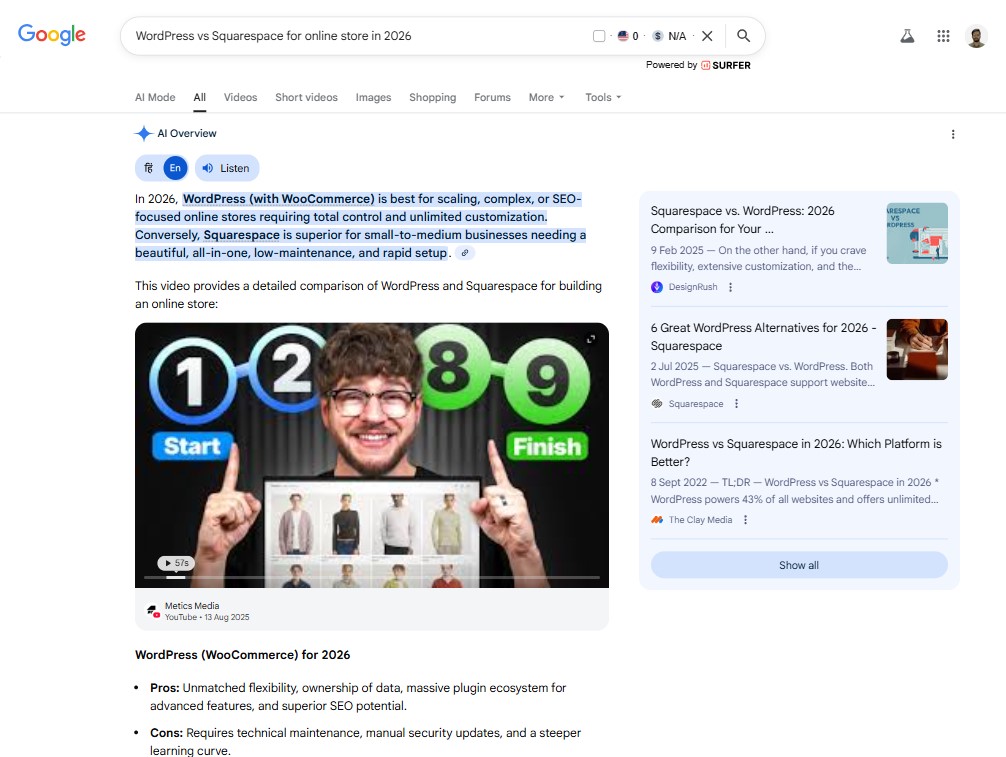
They often appear above traditional search results and may include:
- A written explanation
- Bullet points
- Steps or comparisons
- Links to websites used as sources
Main Components of an AI Overview
The main components of an AI Overview (formerly SGE) in Google Search include:
- Generative AI Text Response: A brief, synthesized answer to the user’s search query, often providing a direct, conversational summary.
- Key Information/Bullet Points: Structurally organized, highlighted text, often in lists, that breaks down the answer for quick reading.
- Source Links (Citations): Links to the websites used by the AI to generate the information, enhancing trustworthiness.
- Expanded Answer Option: A feature allowing users to click “Show More” to see a more detailed, in-depth explanation.
- Visuals/Multimedia (Optional): In some cases, images or diagrams may be included to support the text.
How Are AI Overviews Different From Featured Snippets?
AI Overviews and featured snippets both appear at the very top of Google’s search results, but they’re built on completely different ideas.
A featured snippet is straightforward. It pulls a short excerpt directly from one webpage and displays it as a paragraph, list, or table. That content is quoted almost word for word, and Google clearly points users back to the single source it came from.
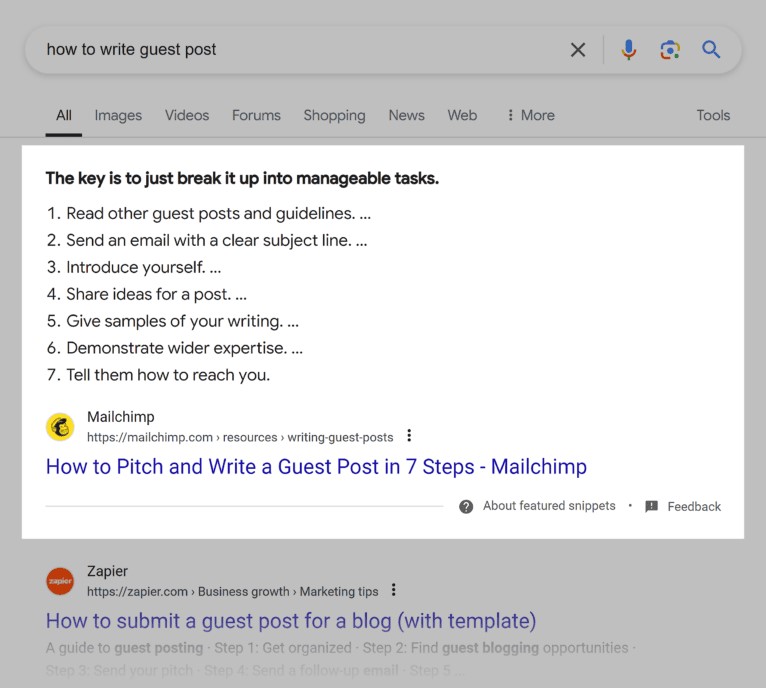
Source: Backlinko
AI Overviews work differently.
Instead of lifting text from one page, Google’s generative model creates a brand-new summary. It pulls signals from multiple sources, blends them together, and presents a unified answer written by the AI itself.
You’re not seeing a quote — you’re seeing a synthesis.
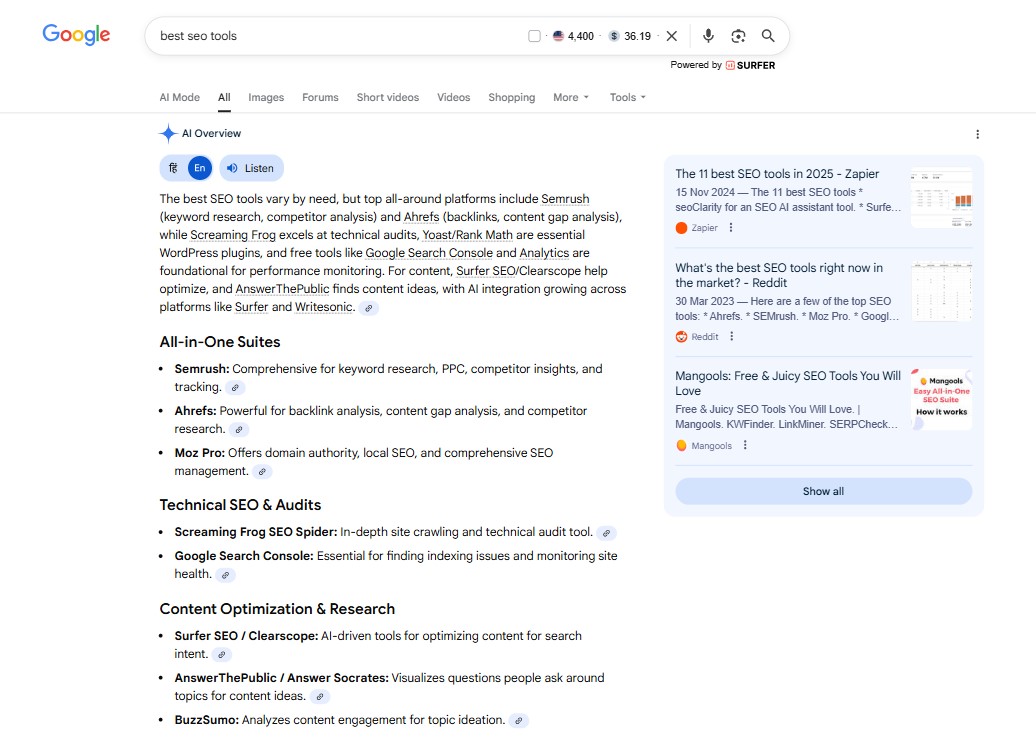
That difference shows up in how they behave. Featured snippets are static. They tend to stay the same unless rankings change.
AI Overviews are fluid. They shift based on the intent behind the query, the sources Google has available, and even the search context.
Citations are another clear divider.
With a featured snippet, there’s usually one visible link sitting neatly beneath the box. AI Overviews, on the other hand, reference several sources at once. These appear as small icons or expandable cards around the summary, pointing out where the information came from without crediting the entire answer to a single site.
AI Overviews also take up more space.
A featured snippet might answer a question in two or three sentences. An AI Overview can stretch much further — multiple paragraphs, bullet points, images, and even follow-up questions.
Some stay partially hidden behind a “Show more” button, while featured snippets are always fully visible from the start.
How Do AI Overviews Work?
Google shows AI Overviews when it believes an AI-generated summary will get the user to a useful answer faster than a standard list of links.
They don’t appear on every search. In fact, data cited by Search Engine Journal suggests that AI Overviews appear in about 21% of queries.
Google is selective, triggering them mostly for searches that are broad, multi-step, or difficult to resolve with a single click.
Behind the scenes, Google relies on its Gemini language model, combined with information pulled from across the web. The system interprets the query, evaluates relevant sources, and then generates a concise, synthesized response that sits above the organic results.
In practice, Google is far more likely to surface an AI Overview for certain types of searches, including:
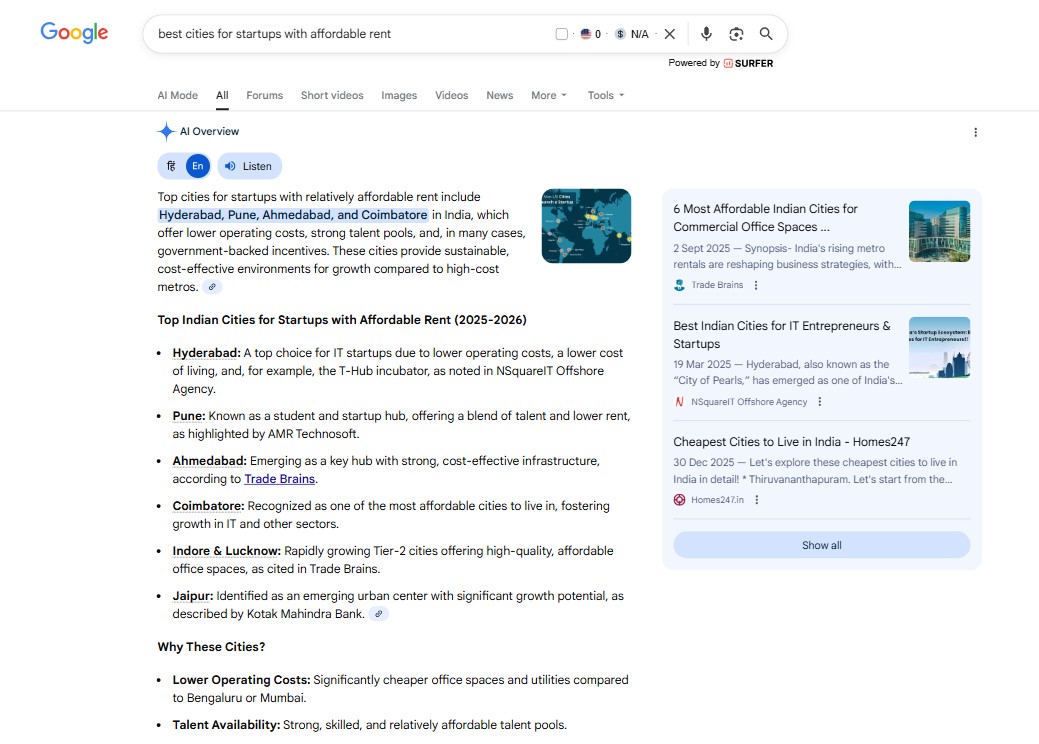
1. Complex or layered queries that usually require multiple searches. For example: “best cities for startups with affordable rent.”
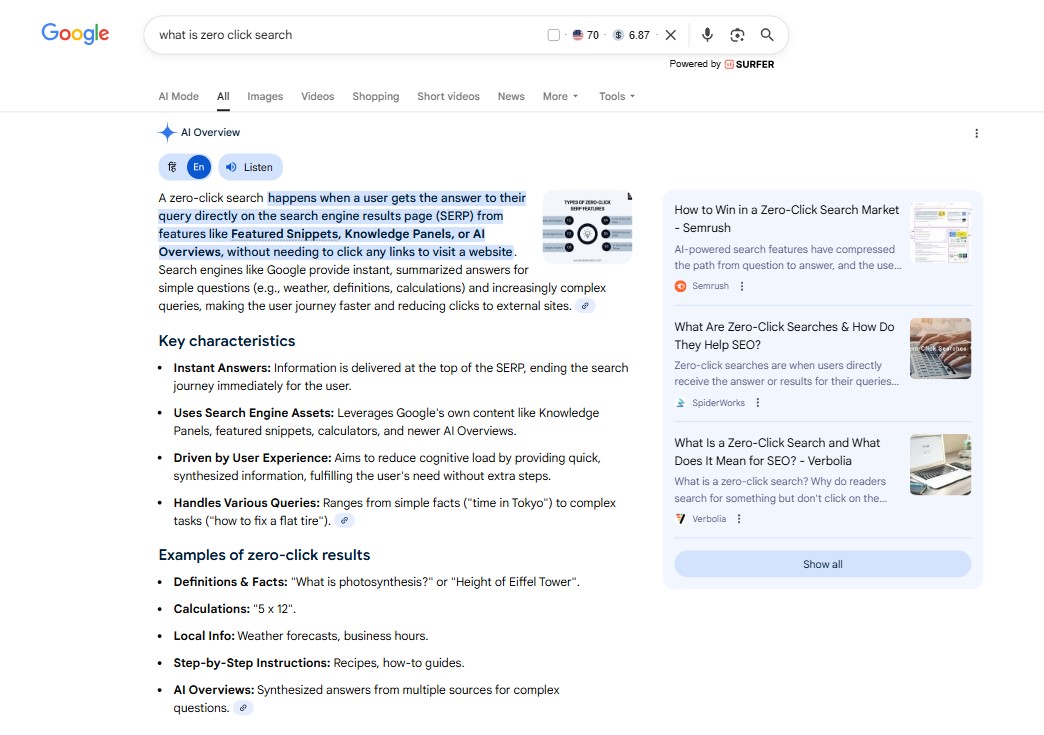
2. Informational, question-based searches, especially those starting with what, how, or why.
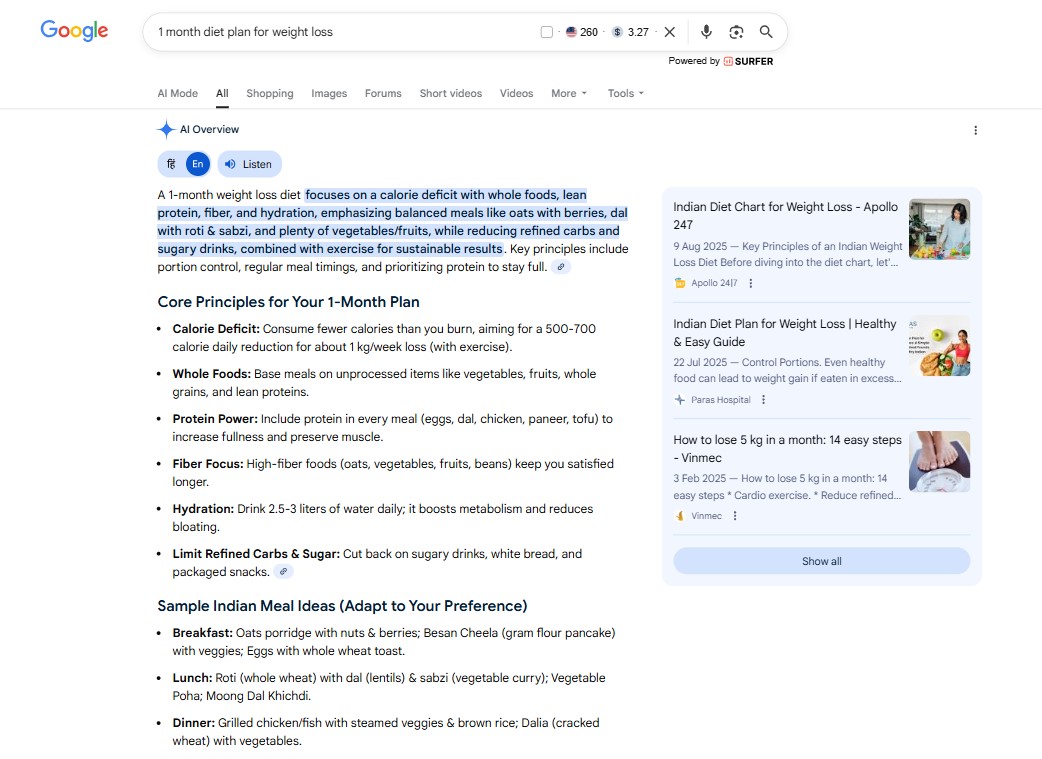
3. Planning, list, or comparison queries, such as travel itineraries, product comparisons, or weekly meal plans.
4. Product research searches, where users are exploring options like “best phones under 25000), while still reserving traditional shopping results for highly transactional intent.

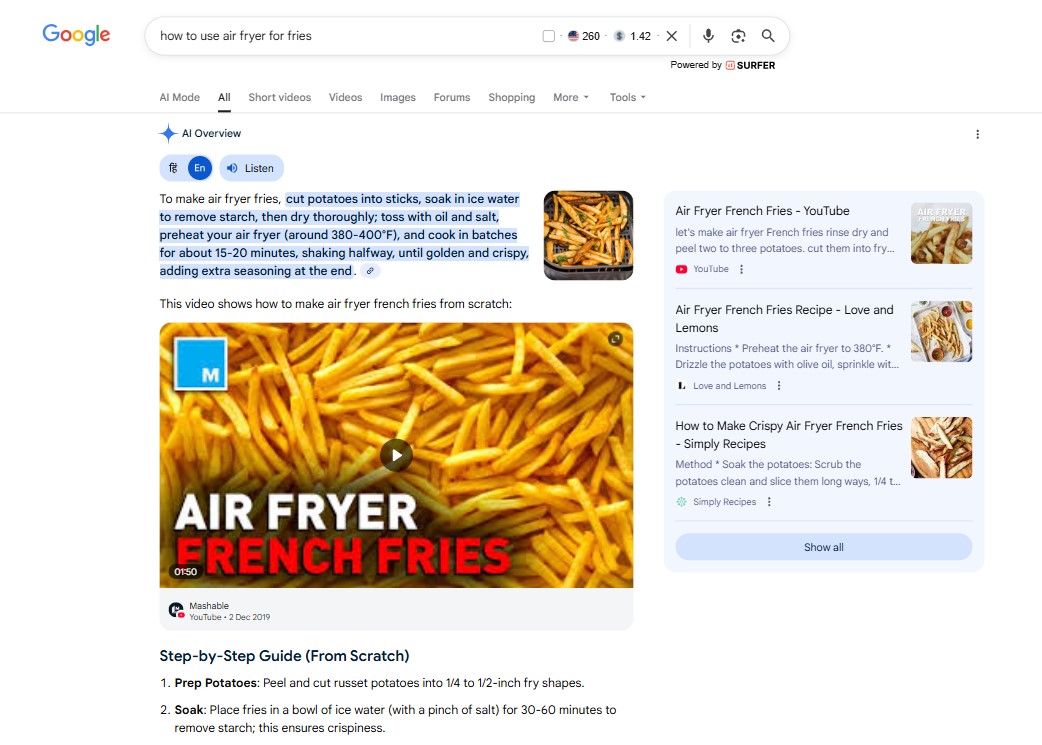
5. How-to searches, where a clear, step-by-step breakdown adds real value.
6. YMYL topics (health, finance, and similar sensitive areas), but only when Google can rely on strong, high-authority sources.
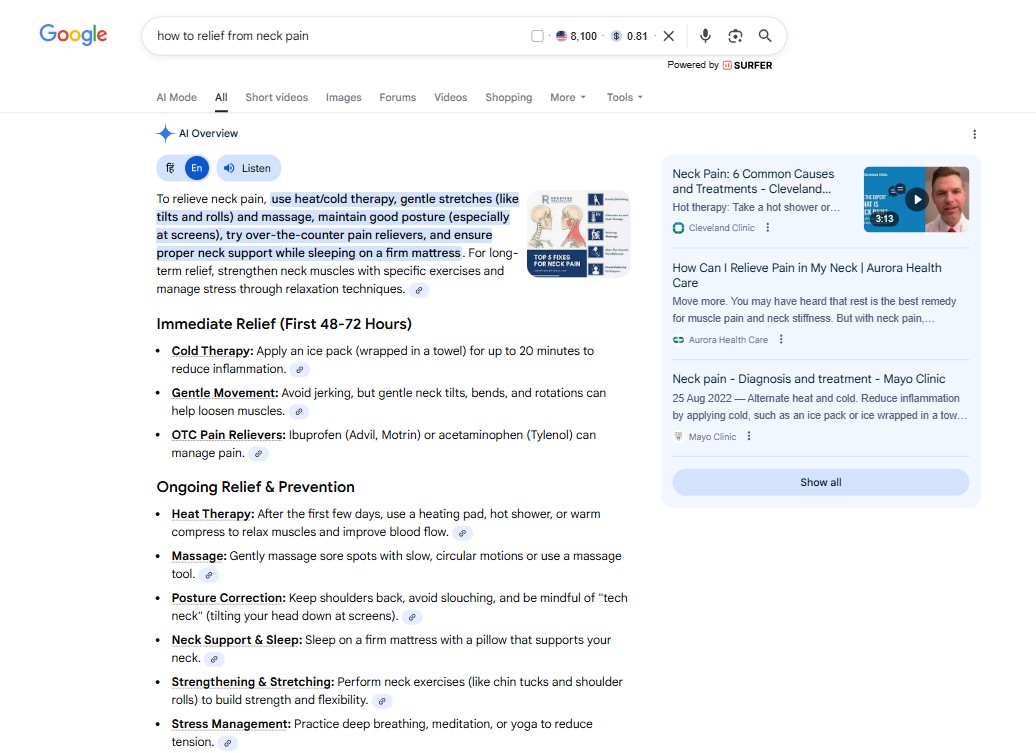
Depending on the query, an AI Overview might appear as a short paragraph, a bullet list, a table, or a blended block that includes images.
And when an AI Overview does appear, it often commands so much attention that the traditional featured snippet below it barely gets noticed at all.
How AI Overviews Affect SEO
AI Overviews are changing how people actually use Google. Instead of scrolling through a page of blue links, many searchers now get a clear, summarized answer right at the top — without needing to click anything at all.
This reshapes the SERP in a few important ways:
- Fewer users click traditional organic results. When the answer is already there, there’s less reason to dig deeper.
- Visibility matters more than ever. If your brand or content is cited inside the AI Overview, you can grab attention even if you’re nowhere near the number-one spot.
- The playing field is wider. Google isn’t just leaning on big, authoritative sites. AI Overviews often pull from a mix of blogs, YouTube videos, Reddit threads, and product pages — whichever sources best answer the question.
How to Optimize Content for Google AI Overviews
There’s no hidden trick or shortcut for getting featured in Google’s AI Overviews. Google has been clear about this: the systems behind AI Overviews rely on the same core signals as regular search.
Put simply, if you’re already following SEO best practices, you’re not starting from scratch—you’re on the right track.
That said, there are practical steps you can take to increase your chances of ranking in AI Overviews.
1. Make Sure Your Webpages Are Crawlable and Indexable
Before Google can use your content in an AI Overview, it must be able to find and understand it. That starts with crawling and indexing.
Crawling is how Google discovers your pages. Indexing is how those pages get stored and made eligible to appear in search results. If either of these breaks down, your content simply won’t be considered — no matter how good it is.
From a technical SEO standpoint, here are the most common issues to watch out for:
- Robots.txt blocking important pages: Your robots.txt file tells Google which pages it’s allowed to crawl (and which it’s not). If it’s accidentally blocking key pages, Google won’t even see them.
- Accidental noindex tags: A noindex meta tag tells Google not to include a page in search results. This often happens by mistake — especially after site migrations or staging setups — and it completely removes those pages from visibility.
- 4XX errors (like 404 or 403): If a page returns an error, Google can’t crawl or index it. Over time, these broken or inaccessible pages reduce the amount of usable content Google can rely on.
- Messy or shallow site structure: Poor internal linking or a confusing page hierarchy makes it harder for Google to crawl your site efficiently — and easier for important pages to be overlooked.
- Sitemap problems: Your sitemap helps Google discover your content faster. If it’s missing pages, outdated, or inaccessible, Google may never find content that could otherwise be useful in AI Overviews.
- Redirect chains and loops: Long redirect chains or circular redirects can stop crawlers from ever reaching the final page, effectively blocking access to your content.
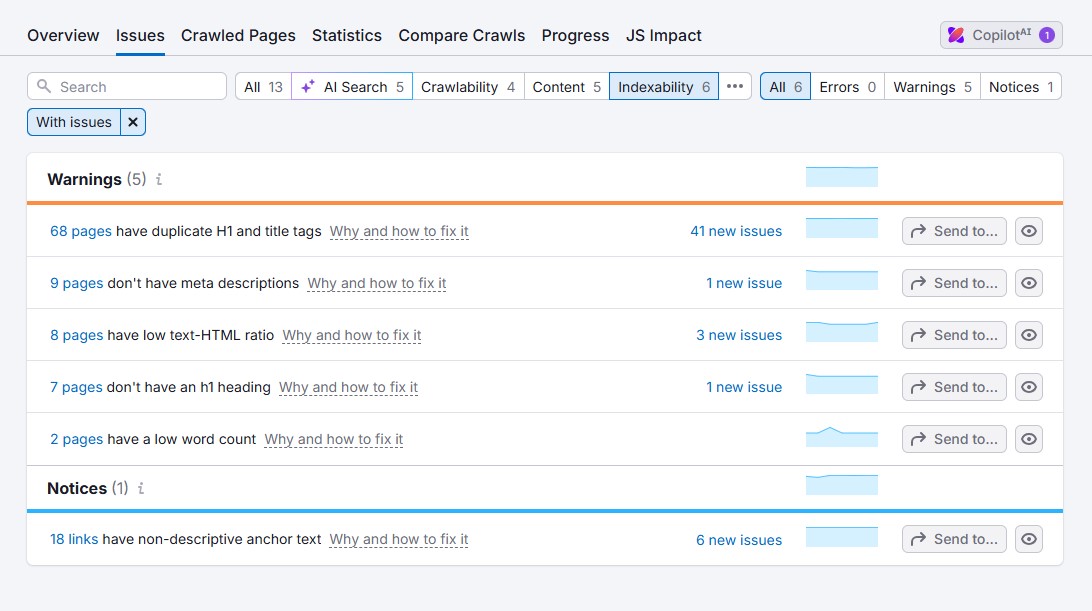
The good news? You don’t have to guess. If you’re using an SEO tool, most of these issues are easy to spot.
For example, Semrush’s Site Audit tool can help you quickly surface crawlability, indexing, and technical problems — often before they start hurting your visibility.
2. Focus on Long-Tail Keywords and Questions
AI Overviews are built to handle more complex searches — the kind people type when they’re looking for a specific answer, not just a general idea. These searches are usually long-tail keywords, often three or four words (or more), and they reveal clear user intent.
If you shape your content around these long-tail phrases and question-based searches, you give Google a much better reason to pull your page into an AI Overview.
The best place to start is solid keyword research. Use keyword research tools to uncover the questions your audience is already asking and the longer, more specific phrases that matter in your niche. Focus on the queries that align with your business, and build content that answers them clearly and directly.
Keyword tools like LowFruits and KWFinder are designed specifically for finding long-tail keywords.

3. Create High-Quality Content
If you want a real shot at being featured in AI Overviews, it starts with one thing: genuinely high-quality content. Google isn’t looking for shortcuts here. Its systems are built to surface content that consistently meets high standards, not content that simply checks a few SEO boxes.
So what does “high quality” actually mean in practice?
In most cases, it comes down to four core principles:
- Accuracy: Your information needs to be correct, up to date, and backed by reliable sources. Guesswork doesn’t cut it.
- Originality: Don’t just repeat what’s already out there. Add perspective, insight, or a clearer explanation than what already exists.
- Expertise: Content performs better when it’s written by someone who truly understands the topic, not someone summarizing from the surface level.
- Real value for the reader: Every piece should solve a problem, answer a question, or help the reader make a better decision.
Meeting these standards doesn’t happen by accident.
It starts with working with writers who truly understand your industry and can write from experience, not just theory. From there, you need a solid editing and review process that checks facts, tightens language, and ensures the final piece genuinely serves the reader.
This matters even more when you’re dealing with “Your Money or Your Life” (YMYL) content — Google’s term for topics that can directly affect someone’s health, finances, safety, or legal situation.
That includes areas like medical advice, financial guidance, legal information, and news about major events.
Because the stakes are higher, Google holds YMYL content to a much stricter standard. Poor-quality or inaccurate information in these areas doesn’t just hurt rankings — it can cause real harm.
4. Improve the User Experience
User experience (UX) plays a major role in both traditional search rankings and Google AI Overviews. Simply put, content that’s easy to use and pleasant to interact with is much more likely to be surfaced.
Several SEO-related factors can influence whether your site appears in AI Overviews, including:
- Page speed: Pages should load quickly—ideally within a few seconds—so users don’t abandon them out of frustration.
- Mobile-friendliness: Your content should adapt seamlessly to any screen size, without forcing users to pinch, zoom, or scroll sideways.
- Secure access: HTTPS isn’t optional anymore. It protects user data and signals trust to both visitors and Google.
In most cases, these fundamentals are handled automatically when you use a popular CMS and a reputable hosting provider. They’re largely baked into the setup.
That said, if your site is custom-built, it’s worth reviewing these areas closely with your development team to make sure nothing slips through the cracks.
At the end of the day, a fast, secure, and frustration-free experience doesn’t just help users—it also increases the likelihood that Google will trust and feature your content in AI Overviews.
5. Improve your on-page SEO
On-page SEO plays a big role in helping Google understand what your content is actually about — and it also increases your chances of being picked up for AI Overviews.
That’s why it’s not enough to focus only on GEO tactics or AI-powered search in isolation. The fundamentals still matter. Strong, well-executed on-page SEO gives both search engines and AI systems the context they need to trust and surface your content.
Pay close attention to the basics:
- Title tags: Include your primary keyword so Google immediately understands the page’s focus.
- Meta descriptions: Write clear, compelling summaries that make people want to click.
- URL slugs: Keep them short, descriptive, and aligned with your target keyword.
- Headings (H1, H2, H3, etc.): Use a logical structure and naturally work in relevant keywords.
- Keyword usage: Sprinkle keywords in naturally throughout the content — no stuffing, no forcing.
- Image alt text: Describe images clearly to improve accessibility and reinforce topical relevance.
- Internal links and anchor text: Link related pages to help users navigate and help search engines understand site structure.
When these on-page elements are done right, Google can accurately interpret your content, which is essential not only for traditional rankings but also for being considered in AI Overviews.
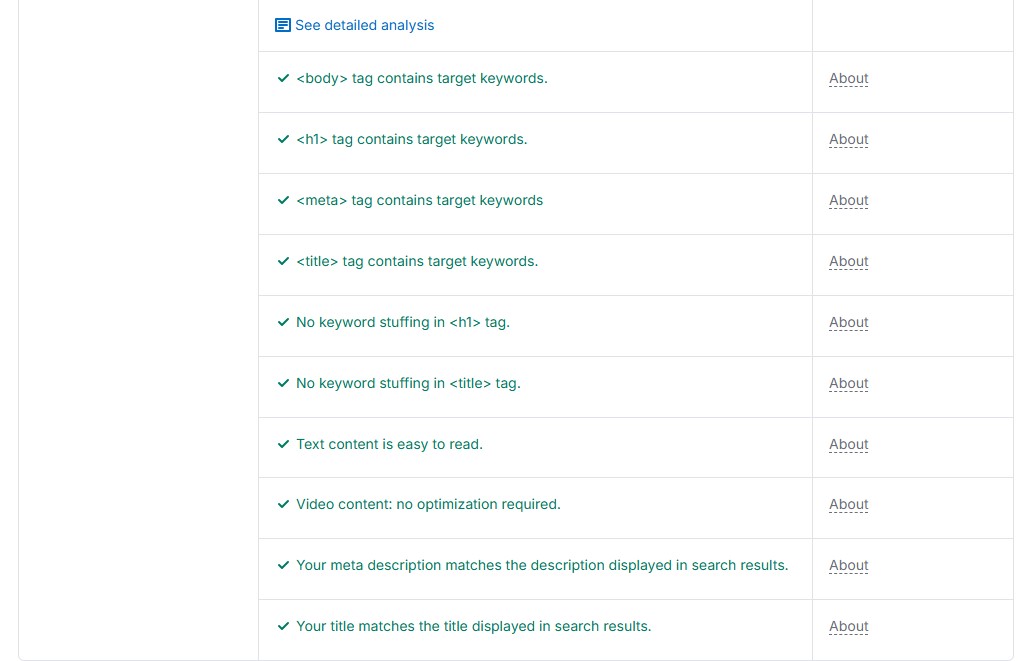
If you want a quick way to spot gaps, the Semrush On Page SEO Checker makes it easy to see whether your pages are properly optimized and where improvements are needed.
6. Focus on Link-Building
Backlinks are simply links from other websites pointing to your content — and in Google’s eyes, they act like votes of confidence. When reputable sites link to you, it tells Google your page is worth paying attention to.
That’s why pages with strong backlink profiles are more likely to show up in AI Overviews.
The most reliable way to earn those links is through thoughtful outreach. Look for websites in your niche that already cover related topics, then reach out with a clear reason why your content would add value for their readers. This isn’t about spamming links — it’s about relevance and usefulness.
Quality backlinks do more than boost traditional rankings. They help establish trust, signaling to Google that your content comes from a credible source — which increases the likelihood of being referenced in AI-generated summaries.
If you’re using an all-in-one SEO platform, chances are it already includes link-building tools to make researching opportunities and managing outreach much easier.
7. Implement Structured Data
Structured data helps Google clearly understand what your pages are about by organizing your content in a way machines can easily read. Instead of guessing, Google gets direct signals about important details such as products, prices, FAQs, recipes, and article information.
For instance, a recipe page marked up with Recipe schema makes it obvious what the ingredients are and which steps to follow. That clarity increases the likelihood that the page will be referenced in an AI Overview, because Google doesn’t have to interpret the content from scratch.
Depending on the type of content you publish, there are several schema types worth using, including:
- FAQPage for question-and-answer sections
- HowTo for step-by-step guides and tutorials
- Article or BlogPosting schema for blog posts and news content
Structured data won’t magically guarantee a spot in AI Overviews, but it does make your content far easier for AI systems to interpret. In practice, that improved clarity can meaningfully increase your chances of being featured.
To make sure everything is set up correctly, you can test your markup using tools like Rich Results Test or Schema Markup Validator. They’ll quickly show you whether your structured data is valid and flag any issues that need fixing.
How to Track and Measure the Impact of AI Overviews
Right now, Google doesn’t offer separate reporting for AI Overviews.
In Google Search Console, impressions, clicks, and average position all get lumped together — AI Overview visibility is mixed in with regular organic results and other SERP features. Because of that, there’s no straightforward way to tell whether your site is showing up specifically in AI Overviews.
At the moment, Google hasn’t released any dedicated tracking for AI Overviews, and there’s been no indication that this will change anytime soon.
That said, you’re not completely in the dark. AI visibility tools can help you monitor how your brand shows up across AI-generated answers — not just in Google’s AI Overviews, but also in platforms like ChatGPT, Gemini, Perplexity, and Claude.
Tools like Semrush, for example, now include AI visibility features that track brand mentions, share of voice, sentiment, and how different AI systems interpret and surface your brand.
You can also see how your products or brand perform for specific AI-driven prompts.
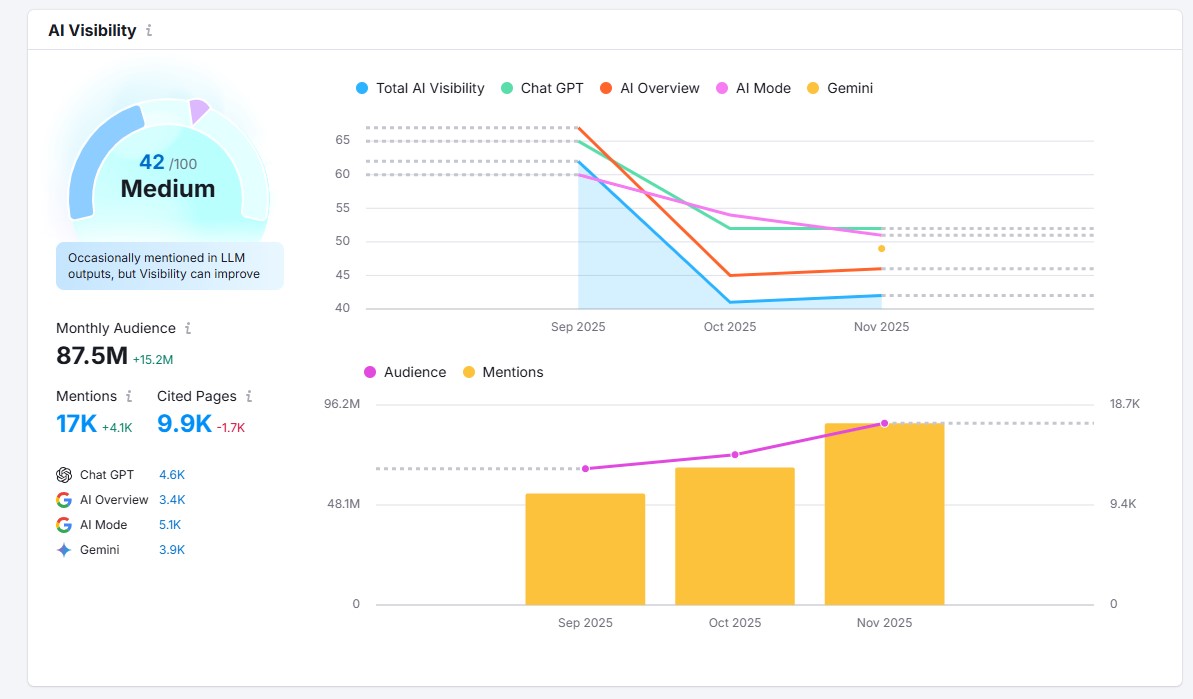
For anyone serious about AI-driven search visibility, that makes Semrush one of the strongest AI SEO tools available right now.
Final Thoughts
Google AI Overviews mark a real shift in how search works, but they don’t rewrite the rules overnight.
At their core, they still depend on the same fundamentals Google has always cared about: useful content, clear structure, strong expertise, and trust.
The difference is that AI Overviews compress more value into the top of the SERP, making visibility — not just rankings — more important than ever.
For beginners, the takeaway is reassuring. You don’t need to “optimize for AI” in some radically new way. If you focus on answering real questions, writing from experience, and building content that genuinely helps users, you’re already aligned with where search is heading.
AI Overviews aren’t the end of traditional SEO. They’re an evolution of it. And for those willing to adapt early, they also open the door to new opportunities for visibility, authority, and long-term growth.
For more, check out these other helpful resources:
- How to Rank in ChatGPT Search: 6 Actionable Tips
- 10 Best AI Search Engines to Use in 2026
- SEO vs GEO vs AEO: Which Matters Most in 2026?
Lastly, follow us on Facebook and X (formerly Twitter) to stay updated on the latest WordPress and blogging-related articles.
Frequently Asked Questions
Do AI Overviews decrease website traffic?AI Overviews can lead to “zero-click” searches for simple queries. However, for complex, multi-step, or niche topics, they often act as a high-quality filter. Users who click the citations within an AI Overview are typically deeper in the research phase and spend more time on the resulting page.
AI Overviews can lead to “zero-click” searches for simple queries. However, for complex, multi-step, or niche topics, they often act as a high-quality filter. Users who click the citations within an AI Overview are typically deeper in the research phase and spend more time on the resulting page.
Do I need to rank #1 to appear in an AI Overview?No. Recent studies show that over 90% of sources cited in AI Overviews do not come from the top 10 organic search results. Google prioritizes “information gain” and clarity over traditional domain authority. Even smaller sites can be cited if they provide a unique, well-structured answer that others lack.
No. Recent studies show that over 90% of sources cited in AI Overviews do not come from the top 10 organic search results. Google prioritizes “information gain” and clarity over traditional domain authority. Even smaller sites can be cited if they provide a unique, well-structured answer that others lack.
What is the "zero-click" impact of AI Overviews on SEO?“Zero-click” searches occur when a user’s question is fully answered by the AI Overview, removing the need to click a website. While this reduces traffic for broad informational terms, the users who do click through are often more qualified and deeper into the “consideration” phase of their journey.
“Zero-click” searches occur when a user’s question is fully answered by the AI Overview, removing the need to click a website. While this reduces traffic for broad informational terms, the users who do click through are often more qualified and deeper into the “consideration” phase of their journey.
Can I opt-out of having my content used in Google AI Overviews?There is no specific “AI Overview only” opt-out. You can use traditional search controls like the nosnippet or max-snippet tags in your robots meta tag, but these will also limit your visibility in standard search previews. Most SEOs recommend staying included to maintain brand visibility in the AI era.
There is no specific “AI Overview only” opt-out. You can use traditional search controls like the nosnippet or max-snippet tags in your robots meta tag, but these will also limit your visibility in standard search previews. Most SEOs recommend staying included to maintain brand visibility in the AI era.
Do AI Overviews appear for every search query?No. AI Overviews primarily trigger for informational, “how-to,” and comparison queries. They are less likely to appear for navigational searches (e.g., “Facebook login”) or highly sensitive “Your Money, Your Life” (YMYL) topics like medical emergencies or specific legal advice, where Google applies stricter safety filters.
No. AI Overviews primarily trigger for informational, “how-to,” and comparison queries. They are less likely to appear for navigational searches (e.g., “Facebook login”) or highly sensitive “Your Money, Your Life” (YMYL) topics like medical emergencies or specific legal advice, where Google applies stricter safety filters.
How can I check the visibility of my brand in AI platforms?You can track brand visibility using AI-specific visibility tools like Semrush, Otterly.ai, or Profound. These tools scan platforms like ChatGPT, Google AI Overviews, Perplexity, etc to see if your brand is mentioned or cited. They provide a “Share of Voice” score, showing how often you appear compared to your top competitors.
You can track brand visibility using AI-specific visibility tools like Semrush, Otterly.ai, or Profound. These tools scan platforms like ChatGPT, Google AI Overviews, Perplexity, etc to see if your brand is mentioned or cited. They provide a “Share of Voice” score, showing how often you appear compared to your top competitors.
Will AI Overviews Replace Featured Snippets?No, the new AI summaries won’t replace featured snippets. They’re separate SERP features and are likely here to stay.
No, the new AI summaries won’t replace featured snippets. They’re separate SERP features and are likely here to stay.
