31 July 2023

8 Best AI Website Builders [Create a Website in Minutes]
Want to know what’s completely changed the way websites get built? AI.
Not long ago, building a website took weeks. Sometimes months, if we’re being honest. Now? You can have one up and running before you finish your coffee—no coding skills. No calling a designer. Just you, your idea, and some smart tech doing the heavy lifting.
If you run a business, write a blog, or freelance, you need a website. That part isn’t optional anymore. But hiring a developer can cost anywhere from $1,000 to $10,000. That’s a big investment.
Traditional website builders are cheaper, sure. But you still end up spending hours dragging and dropping elements around the screen. It starts to feel less like building a site and more like solving a strange puzzle.
AI changes all of that.
In this guide, we’ll walk you through the best AI website builders available right now. We’ve tested them ourselves. We’ve built real sites with them. And yes, we have strong opinions about which ones are worth your time—and which ones aren’t.
Let’s dive in!
What Is An AI Website Builder?
An AI website builder—sometimes called an AI website generator or web design tool—uses artificial intelligence to create a full website from a simple prompt.
Instead of spending hours dragging and dropping elements into place, you just answer a few questions. What does your business do? Who are you trying to reach? What kind of look and feel do you want? Based on your answers, the AI builds the site for you.
And we’re not talking about a basic template you still have to tweak for days. It generates a complete website in minutes. That includes the design, layout, written content, and even images.
The AI handles the hard parts. It chooses colors that actually look good together. It sets up layouts that guide visitors’ attention. And, it writes content that speaks to your audience.
So you’re not staring at a blank page. You’re starting with a site that’s already about 80% finished.
What Are the Benefits of Using an AI Website Builder?
If you’re thinking about building a website, an AI website builder can make the whole process a lot easier.
Here’s why so many people are using them:
- Saves Your Time: You don’t have to start from scratch. Just answer a few questions, and the AI builds your site in minutes. What used to take days can now take less than an hour.
- No Design or Coding Skills Needed: You don’t need to know HTML. You don’t need to hire a designer. The AI handles the layout, structure, and visual details for you.
- Lower Cost than Traditional Web Design: Hiring a developer can get expensive fast. An AI website builder gives you a professional-looking site without the big price tag.
- SEO-Friendly From the Start: Many AI website builders generate content and structure that follow basic SEO best practices. That means your site has a better chance of showing up in search results.
- Content Created for Your Business: The AI writes text based on what you do and who you serve. You can edit it anytime, but you’re not staring at a blank page.
- Easy Updates and Changes: Want to tweak your content? Add a new service? Update your images? You can do it quickly without breaking your site.
In short, an AI website builder helps you launch faster, spend less, and skip the technical headaches. It’s a smart option for small businesses, freelancers, and anyone who wants to get online without the stress.
What Are the Limitations of AI Website Builders?
AI website builders are fast and convenient. But they’re not perfect. Here are a few limitations you should know before jumping in:
- Limited Customization: AI can generate a solid design. But deep customization can be tricky. If you want something very specific or highly unique, you might hit a wall.
- Design Similarities: Many AI websites follow similar layout patterns. That’s not always bad. But it can make your site look like others in your industry.
- Less Control Over Technical Performance: Page speed, code structure, and backend flexibility may not be fully in your hands. That can matter if you care about performance or long-term scalability.
How We Tested These AI Website Builders
We didn’t just skim a few marketing pages and call it a day.
We actually built real websites with each platform to see how they perform in the real world.
Here’s what we focused on:
- How good is the AI, really?
- Can you launch a site in under 30 minutes?
- Does it look polished and professional? Or does it feel like your nephew’s first web project?
- What does it truly cost once you’re up and running?
- And when the AI messes something up, can you easily fix it?
8 Best AI Website Builders
Here are some of the best drag-and-drop website builders you can check out:
1. Hostinger AI Website Builder

Hostinger is #1 on our list of the best AI website builders.
Hostinger’s AI website builder is an outstanding AI website generator developed to ease the process of building professional-looking websites. With its user-friendly design and extensive features, the builder provides an easy solution for both beginner and experienced users.
Whether you’re an individual trying to showcase your portfolio or a small business owner looking to develop an online presence, the AI website builder gives a complete platform to bring your idea to life.
Furthermore, the builder’s powerful algorithms and intelligent design abilities allow you to create great websites without the need for coding or technical experience. This means even with little technical knowledge, you can easily create and manage websites.
Best Features:
- Drag-and-drop website builder for building a website.
- AI Logo Maker to create a custom logo in seconds.
- Built-in AI writer tool to automatically generate compelling content.
- Built-in SEO tools to help you improve your website’s search engine ranking.
- AI Heatmap feature.
- Mobile-responsive out of the box.
- 24/7 customer support.
Best For:
Hostinger AI Website Builder is a good option for beginners or small businesses looking for a budget-friendly AI website builder with cheap hosting services.
Pricing:
Hostinger offers a one-price plan for the website builder, which is $2.99/mo.
Try Hostinger AI Website Builder
2. Wix ADI

Wix ADI is an AI-powered website builder that streamlines website creation with its innovative AI assistant.
Its AI technology streamlines the process of designing websites, making it a popular option for you if you don’t have the technical knowledge or time to dedicate to website creation. The platform allows you to construct visually appealing websites, landing pages, and online stores. If you’re seeking a simple and effective AI tool for web design, Wix ADI is a good option.
Not all of the options offered in the ordinary Wix website builder are available in the ADI interface. Once an AI website is built, you can convert it to Wix’s standard editing interface for advanced features. However, once converted, ADI will no longer be available on that website. You should stay on the ADI editor if you want to continue using AI website building for your websites.
Best Features:
- Drag and drop editor to create your website.
- Advanced editing options to choose your main color, palette, and theme.
- Built-in SEO tools to drive organic traffic.
- AI Text Creator to generate text across the site.
- Use analytics to track your website’s performance and other stats.
- Offers seamless integration with numerous third-party apps and services.
Best For:
Wix ADI is a good option for small businesses, startups, and beginners who want a quick, hassle-free website creation experience.
Pricing:
Using Wix ADI will cost you nothing because it is one of the best free AI website builders. This means your website has Wix branding and domain. To remove Wix branding, the premium plan starts from $16/mo.
3. 10Web

Like many AI website generators out there, 10Web lets you create a polished, professional site in just a few minutes. The difference is that it runs on WordPress, which many people already know and use.
The platform uses AI to build a full website for you. It creates the layout, writes the content, and even adds images. All you have to do is answer a few basic questions about your business. One standout feature is its ability to recreate an existing website. Just paste in a URL, and the AI will turn that design into a customizable WordPress template you can edit.
That said, it’s not a “click once, and you’re done” kind of tool. The AI does a solid job, but you’ll likely need to tweak things to make the site feel truly unique and polished. Some designs can feel a little stiff. And if you want complete creative control, relying on Elementor might feel limiting.
10Web aims to keep things simple while still offering many features. For beginners, that can feel overwhelming at first. There’s definitely a learning curve before you feel fully comfortable using everything.
Best Features:
- AI-powered website design with content and images.
- Automated one-click migration to move old websites for an even faster process.
- PageSpeed Booster to optimize website performance for both desktop and mobile.
- Real-time backups and top-notch security.
- 50+ basic and premium widgets to help streamline your site-building process.
- 100% responsive and mobile-friendly AI-generated websites.
- AI SEO tool to optimize websites for better search rankings.
Best For:
10Web is ideal for web creators who want to use WordPress for their websites.
Pricing:
10Web plans start from $10/mo (billed annually), including AI, hosting, and security tools.
4. Framer AI
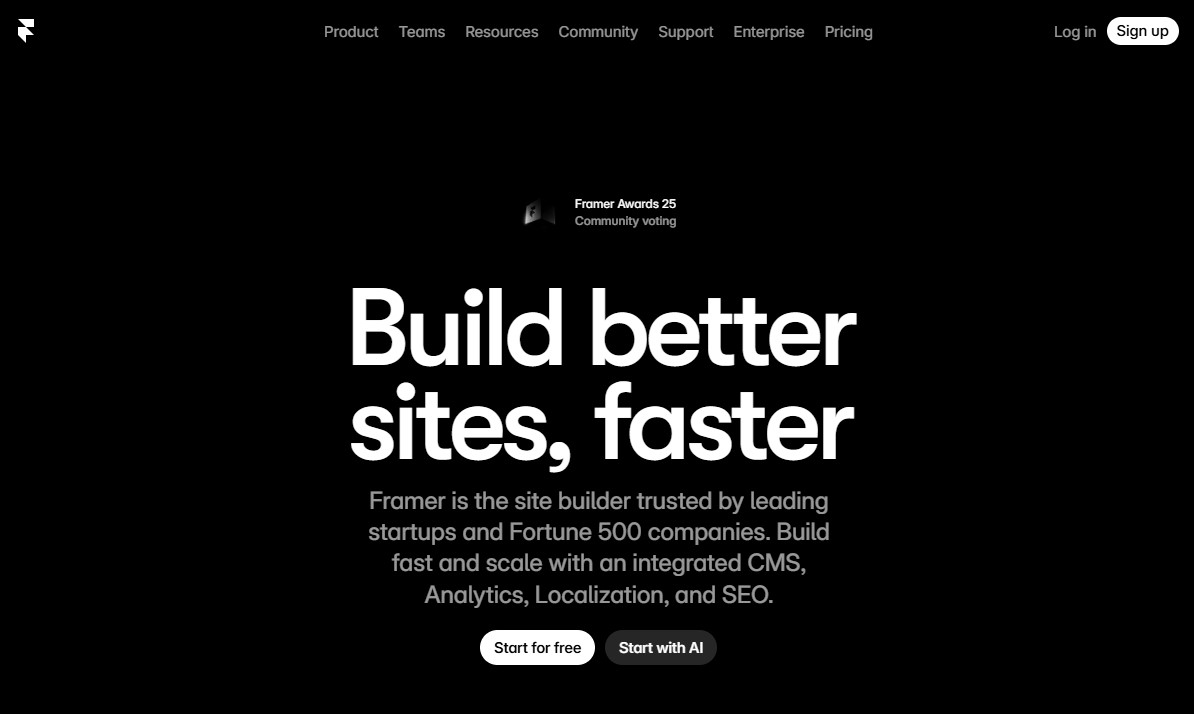
Framer AI is a website builder created by the team behind Framer. In the beginning, Framer was mainly a design tool. Over time, it evolved into a full website builder and started competing with platforms like Webflow.
These days, it’s especially popular with startups and small businesses. The main reason? It lets you build clean, great-looking websites in a short amount of time.
Here’s how it works. First, Framer AI generates a wireframe for your site. You just tell it what kind of website you want—maybe a portfolio, a blog, or a business site. It takes that input and creates a basic layout for you.
Next, you move into something called Workshop mode. This is where you can add new sections or adjust existing ones with the help of AI. After that, you can fine-tune the design on the visual canvas. You can tweak spacing, update text, swap images, and make everything look just right.
The best part? You don’t need to write a single line of code. It’s a true no-code tool. For most people who just need a standard website, Framer AI will feel more than enough.
Best Features:
- Describe your idea in a few sentences, and Framer AI turns it into a live website in minutes.
- It generates sleek layouts with strong typography and smooth spacing that look agency-made.
- You can tweak text, images, and layout instantly with an intuitive visual editor.
- Customize meta titles, descriptions, and URLs to help your site rank better.
- Built-in hosting with optimized speed and global delivery.
- Share your project and work with team members in real time.
Best For:
Framer AI is for designers, marketers, and no-code creators who want a visual website builder.
Pricing:
Free with Framer branding and domain for hobby projects. The premium plan starts from $5/mo (billed annually).
5. Jimdo

Next on our list of best AI website builders is Jimdo. With Jimdo, you can create a multi-page site in minutes. All you have to do is answer a few questions about your goal and design preferences.
Then, you’ll choose a theme and color scheme that best suits your vision as well as the pages you need. Jimdo will generate two beautiful website choices for you to choose from.
Furthermore, Jimdo automatically optimizes your website for SEO to improve your Google rankings.
Overall, Jimdo offers a user-friendly solution to create a website with minimal hassle.
Best Features:
- Image database with royalty-free photos.
- Create a free logo with the Jimdo Logo Creator.
- Easily connect your own domain to your Jimdo site.
- Statistics to analyze your website traffic.
- Contact forms to collect your visitors’ contact details.
Best For:
Jimdo is best for beginners and small business owners looking for an easy-to-use, affordable, and mobile-friendly website builder.
Pricing:
Jimdo offers a free plan with Jimdo ads and subdomains. The pro plan starts from $3.65/mo with an ad-free experience and a custom domain.
6. Bookmark

Bookmark is an AI-based website builder that allows you to create excellent websites quickly and easily. The platform uses an artificial intelligence design assistant (AiDA) to speed up the design process and deliver customized websites tailored to your requirements. This AI assistant helps you quickly create functional websites in no time.
Aside from being a quick-to-launch AI website generator, Bookmark provides AI optimization of on-page content. It will analyze a webpage against important metrics and give recommendations on how to improve page results. It also generates AI translations of your whole website and publishes them in up to three target languages. As a result, allowing you to reach your customers in every language.
Best Features:
- Edit your website or store in minutes with a drag-and-drop AI website builder.
- Create as many sub-pages for your website as you want.
- Detailed analytics and insights on your website visitors and performance.
- Unlimited website storage and bandwidth.
- Easily create an eCommerce store and sell across platforms.
- Choose from hundreds of free high-quality images and videos for your site.
- Fully GDPR compliance.
Best For:
A bookmark is a good solution for small business owners, entrepreneurs, and freelancers who want a solid platform that fulfills all website needs.
Pricing:
Bookmark offers a 14-day free trial if you want to try Bookmark. The premium plan starts from $24.99/mo (billed annually).
Try Bookmark 14-Day Free Trial
7. AppyPie

AppyPie is the next best AI and no-code website builder on our list. It is an excellent choice if you want to build and run a professional website with little work, time, or money.
One key difference of AppyPie is that this tool allows you to express your purpose in plain words. You don’t have to go through a multi-step procedure to answer the system’s queries. Instead, you can write a few sentences about what you want to build. Then, its cloud-based website builder allows you to create fast and lightweight websites that are easily accessible with mobile and desktop devices.
Best Features:
- Easily turn a website into an app.
- Unlimited bandwidth and storage.
- Edit and make changes to your website in real time.
- SSL security protects your website from potential cyber threats.
- The AppyPie AI website builder uses low data to create the website.
Best For:
AppyPie is the ideal solution for beginners and small businesses who want an easy way to create a website for their business.
Pricing:
AppyPie plan starts from $18/mo.
8. Durable

Durable is an innovative platform that uses artificial intelligence to help you create stunning and functional websites in a matter of seconds. With its AI-powered technology, this website builder is a one-of-a-kind, time-saving option for small businesses or individuals wanting to establish an online presence.
To create a website with Durable, you need to answer a few simple questions like “What type of business are you building?” and “Where is your business located?” Then, it will create a website for you.
Further, Durable makes it easy for you to customize the design. It’s possible to regenerate sections in one click. All you need to do is hover the mouse over the section you want to change and click the “Regenerate section” button. The editor will create a new version of the section in a few seconds.
Best Features:
- Customize your site with an AI-power website editor.
- Built-in SEO tools for optimizing your website for search engines.
- Automatically add professional images and icons to your site.
- SSL, firewall, and DDOS protection to protect your website.
Best For:
Durable is ideal for startups and small businesses.
Pricing:
Durable plan starts from $12/mo (billed annually).
Conclusion: Best AI Website Builders
AI website builders are a great way to create a professional-looking website without learning how to code. These builders use artificial intelligence to help you design and customize your website, making the process quick and easy.
There are many different AI website builders available on the market, some of which we’ll discuss above in this article.
Each of these builders offers a number of features, including drag-and-drop interfaces, AI-powered design tools, mobile-friendliness, SEO optimization tools, etc. Whether you’re a beginner, a small business owner, a freelancer, a creative professional, or run a large enterprise, there’s a solution on this list that’s tailored for you.
We hope this article helps you find the best AI website builder for your website.
For more, check out these other helpful resources:
Lastly, follow us on Facebook and X (formerly Twitter) to stay updated on the latest WordPress and blogging-related articles.
Frequently Asked Questions
What is the Best AI Website Builder?Wix ADI is the best AI website builder. Wix ADI provides an AI-driven design process that allows you to create visually appealing websites with minimal effort.
Wix ADI is the best AI website builder. Wix ADI provides an AI-driven design process that allows you to create visually appealing websites with minimal effort.
What is the Best Free AI Website Builder?Wix ADI is the best free AI website builder. It offers a free plan that allows you to create a basic website with up to 5 pages.
Wix ADI is the best free AI website builder. It offers a free plan that allows you to create a basic website with up to 5 pages.
How Do I Create an AI-Powered Website?To create an AI-powered website, you need to use a website builder that has AI functionality built in. The AI won’t run the site for you, but it will help you in various tasks such as text generation or design, saving you time and letting you focus on other tasks.
To create an AI-powered website, you need to use a website builder that has AI functionality built in. The AI won’t run the site for you, but it will help you in various tasks such as text generation or design, saving you time and letting you focus on other tasks.
Can AI Code a Website?Yes, AI can code a website. There are a number of AI-powered tools that can generate HTML, CSS, and other code for websites. These tools can be used to create basic websites or to generate code for more complex websites.
Yes, AI can code a website. There are a number of AI-powered tools that can generate HTML, CSS, and other code for websites. These tools can be used to create basic websites or to generate code for more complex websites.
Can AI Replace Web Developers?It is unlikely that AI will completely take over web development in the near future. While AI can help with tasks such as code optimization and testing, it still lacks the creativity and problem-solving skills that human web developers possess. Web development also involves a lot of communication and collaboration with clients and team members, which requires a human touch. So while AI will continue to play a role in web development, it is unlikely to fully replace human developers.
It is unlikely that AI will completely take over web development in the near future. While AI can help with tasks such as code optimization and testing, it still lacks the creativity and problem-solving skills that human web developers possess. Web development also involves a lot of communication and collaboration with clients and team members, which requires a human touch. So while AI will continue to play a role in web development, it is unlikely to fully replace human developers.
Is Wix ADI Free?No, Wix ADI is not completely free. While building a website on the Wix platform is free, many premium features and functionality may require a paid plan to use.
No, Wix ADI is not completely free. While building a website on the Wix platform is free, many premium features and functionality may require a paid plan to use.
